
 English
 العربية
 Deutsch
 Español
 Français
 Italiano
 Português
 Русский
 Türkçe
 Tiếng Việt
YouTube Tag Extractor
YouTube Tag Extractor Copy & Paste (FREE)






Abhijit Adhikari, Developer
Fluxy Team
When you upload a video on YouTube, you want people to find it. Tags help with that. Tags give YouTube context about your video and help the platform understand your topic. But many creators struggle to pick the right tags. This is where a YouTube Tag Extractor becomes useful. It allows you to look at tags used by other videos so you can learn what works. It gives you a simple way to study the search terms used in your niche. This helps you improve your own video tags with real data instead of guesswork.
What Is a YouTube Tag Extractor?
A YouTube Tag Extractor is an online tool that collects tags from a public YouTube video. When you enter the video URL, the tool reads the page and pulls the tags added by the creator. These tags are not visible on the video page, so the extractor gathers them through the page’s metadata.
Tags help YouTube understand the topic. They also support YouTube Search and YouTube’s recommendation system. By using a YouTube Tag Extractor, you can see which keywords popular videos use. This gives you insight into what viewers search for related to that topic.
Why Are YouTube Tags Important?
Tags do not rank your video by themselves. But they help YouTube understand your content. They support search relevance and help YouTube link your video to similar topics. When tags match real search terms, your video has a better chance of appearing in relevant searches.
Tags help in a few key areas:
-
Clarifying the topic when titles and descriptions cannot say everything
-
Supporting search relevance for long-tail keywords
-
Helping YouTube link your video to similar videos
-
Reducing confusion for videos with similar titles
Because tags support discoverability, studying tags used in top-ranking videos gives you a better idea of what users search for.
How to use YouTube Tag Extractor
1 step- Go YouTube and copy the url of that video you want to extract the tags.
2 step- Now paste the copied url in the box. You can do this by copy button right side of the box.

3 step- Solve the captcha or I'm not a robot. If you are logined then you will not see this option. Login users are extract faster then non login users.

4 step- Click on Extract button and you will see all extract tags within a miniute.
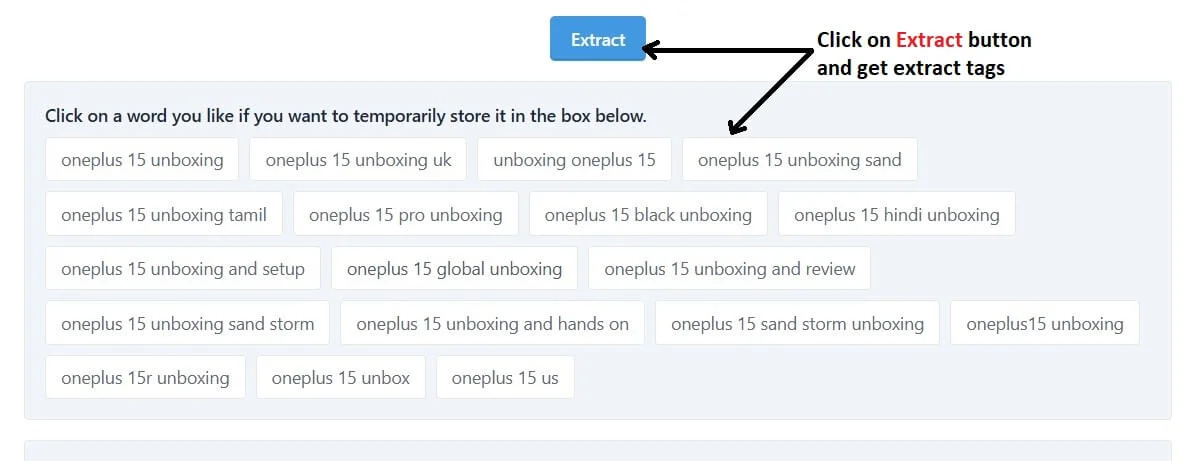
5 step- Now select the tag which you want to copy by click on the each tag one by one.
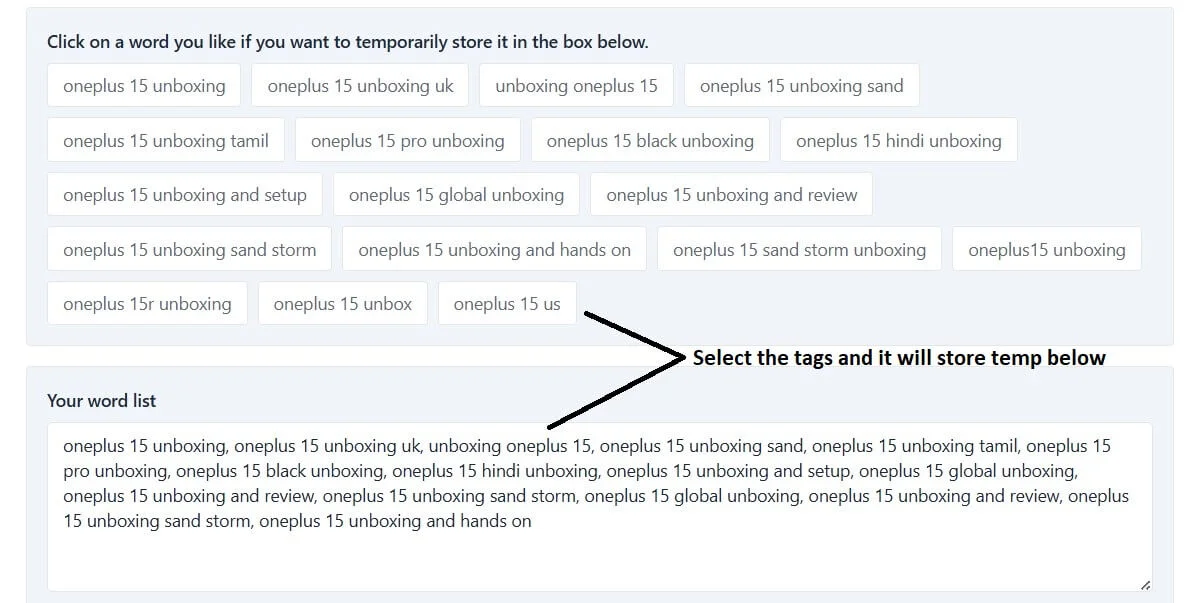
6 step- Now you can copy all the selected tags by Copy selected words button. You can also write your own tag in the list of selected tags box and copy all. If you want to clear all the selected tags you can do this by click on Clear selected words button.
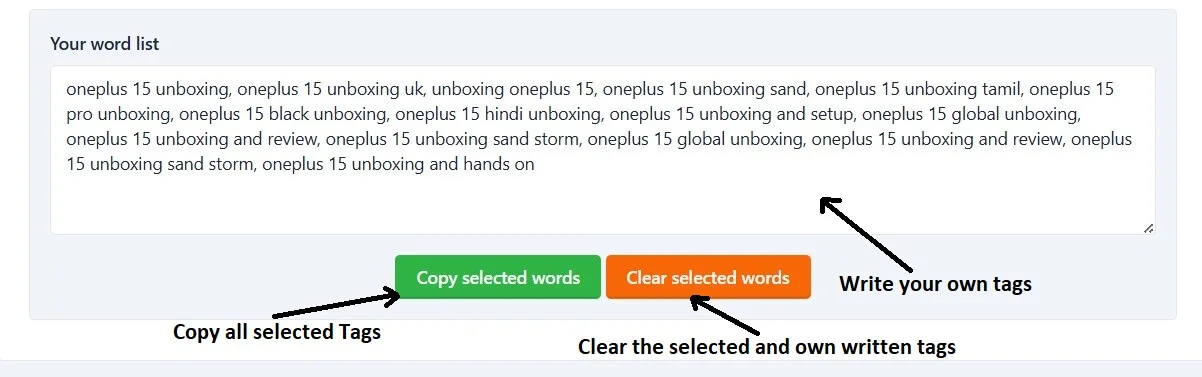
See how it's simple to extract the tags on FluxyTools.
Benefits of Using a YouTube Tag Extractor
1. Keyword Research Made Simple
Instead of guessing which keywords people search for, you can check what successful videos use. This cuts down on research time and gives you accurate information.
2. Learn From Your Competitors
When you study top videos in your niche, you understand what terms help them get traffic. You can then create similar tags for your own videos while keeping your content unique.
3. Build a Better Tag Strategy
Seeing real data helps you pick tags that match what viewers search for. You can combine broad and specific tags, check keyword variations, and use tags that support your main topic.
4. Improve Video Visibility
While tags alone do not rank a video, they guide YouTube’s system. Strong, relevant tags help the platform classify your video the right way. This improves your chances of appearing next to similar videos or in search results.
5. Avoid Keyword Stuffing
Tag Extractors help you see how many tags top creators use. You can keep your tags clean and relevant instead of adding too many random keywords.
When Should You Use a YouTube Tag Extractor?
You can use a YouTube Tag Extractor during different stages of planning and uploading your video. Here are common cases:
-
When researching video ideas
-
When checking what tags competitors use
-
When planning your title and description
-
When updating old videos to improve search relevance
-
When starting a new channel and learning your niche
Using the tool as part of your research process helps you work more efficiently.
FAQs of YouTube Tag Extractor
A YouTube Tag Extractor is a tool that collects tags from any public YouTube video. It helps you see the keywords a creator used.
You paste a YouTube video link into the tool. It reads the video’s metadata and shows all tags used in that video.
It helps you study tags used by top videos, plan better keywords, and understand what viewers search for in your niche.
Yes. Tags help YouTube understand your content and match it to relevant searches, especially when titles and descriptions are unclear.
It does not rank your video directly, but it guides you to use better tags, which helps YouTube classify your video correctly.
Yes. It reads public metadata only. It does not break YouTube rules or access private data.
You can use extracted tags for research. Use only tags that match your own content to avoid confusing YouTube.
No. Titles and descriptions matter more. Tags only support your main keywords and help with context.
Use clear and relevant tags. There is no perfect number, but most creators use 5–15 strong tags.
Yes. Long-tail tags help you reach more specific searches and improve topic clarity.
It works for most public YouTube videos unless the creator hides the video or uses restricted settings.
Yes. It helps beginners learn how top videos use keywords and makes planning tags much easier.
Related Tools :
- YouTube Thumbnail Downloader
- YouTube Channel Logo Downloader
- YouTube Tag Generator
- YouTube Title Generator
- YouTube Description Generator
- YouTube Hashtag Generator