
 English
 العربية
 Deutsch
 Español
 Français
 Italiano
 Português
 Русский
 Türkçe
 Tiếng Việt
Zombie Subscriber Calculator
Are You a Cult Leader or Running a Ghost Town? 🧟






Abhijit Adhikari, Developer
Fluxy Team
What is a Zombie Subscriber? (And Why They Are Dangerous)
A Zombie Subscriber is a YouTube account that is subscribed to your channel but never watches, clicks, or engages with your content. In the eyes of the algorithm, these are "dead" accounts that inflate your subscriber count (a vanity metric) while dragging down your engagement rate (a performance metric).
Zombies usually fall into three categories:
- Bot Accounts: Fake profiles created by "sub-for-sub" services or spam networks.
- Abandoned Accounts: Real users who lost access to their login or simply stopped using YouTube years ago.
- The "Niche-Switch" Crowd: Real people who subscribed for one type of content (e.g., Gaming) but ignored you when you switched topics (e.g., Cooking).
The "Algorithm Trap": How Zombies Kill Reach
Many creators ask: "Does it matter if they don't watch? At least I have the number!"
In 2026, the YouTube Recommendation System (Discovery Engine) prioritizes Click-Through Rate (CTR) and Average View Duration (AVD) above all else. Here is the mathematical problem Zombies create:
1. The CTR Tank
When you upload, YouTube tests your video with a sample of your subscribers. If 1,000 Zombies see the thumbnail but 0 click, your CTR drops to near zero. The algorithm assumes the video is bad and stops promoting it to non-subscribers.
2. The "Ghost Town" Effect
Sponsors and Brand Deals look at your Views-to-Subscriber Ratio. A ratio below 2% signals a "dead channel." This lowers your negotiating power for sponsorships.
3. RPM & Revenue
You are paid for Monetized Playbacks, not subscribers. Zombies do not generate ad revenue. They only confuse your analytics, making it harder for you to know what your actual audience wants.
How the FluxyTools Calculator Works (Methodology)
Unlike generic estimators, the FluxyTools Zombie Calculator uses the official YouTube Data API v3 to perform a live audit of your channel's health.
Our algorithm performs the following calculations:
- Data Collection: We fetch your Total Subscriber Count and scan your last 15-30 Public Long-Form Videos (Shorts have different metrics and are excluded for accuracy).
- Active Viewer Baseline: We calculate your median view count, removing viral outliers that might skew the data.
- The Gap Analysis: We compare your Potential Audience (Subs) vs. your Actual Audience (Views) to derive the Zombie Percentage.
🛡️ Privacy & Security Note:
This tool only analyzes Publicly Available Data. We do not require your YouTube password, we do not ask for OAuth permissions, and we cannot make changes to your channel. It is 100% safe to use.
How to Audit Your Channel in 3 Steps
Checking your channel health takes less than 10 seconds. Follow this guide:
Get Your Link
Go to YouTube and copy the URL of your Channel Homepage (e.g., youtube.com/@YourHandle). You can also use the link of any specific video on your channel.
Run the Scan

Paste the link into the box above and click "Calculate Zombies 🧟". The tool will verify that the channel is public and fetch the data via the API.
Review the Health Report
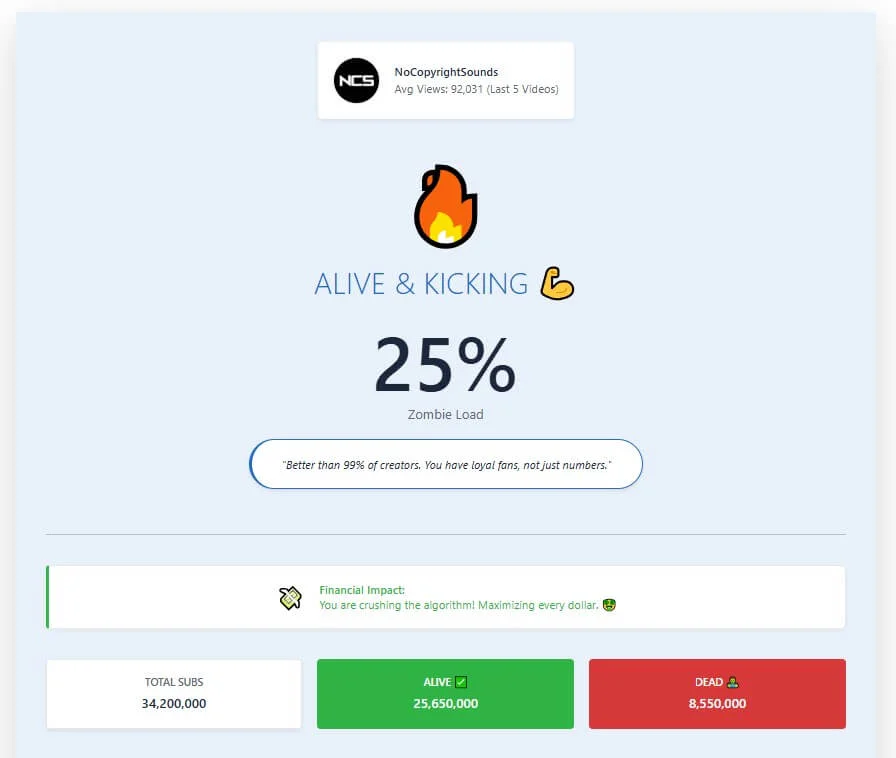
See your Active vs. Inactive ratio. If your "Zombie Level" is high (over 50%), check the strategy guide below.
Expert Strategy: How to "Wake Up" or Remove Zombies
If your calculator result is "High Risk," don't panic. You cannot simply hit a "Delete" button for subscribers on YouTube, but you can signal the algorithm to focus on your active fans.
1. The "Re-Engagement" Poll
Use the Community Tab to post a poll. Community posts often reach subscribers who haven't watched a video in months. If they interact with the poll, YouTube may try showing them your next video thumbnail.
2. Pivot with Purpose
If you have high zombies because you switched niches (e.g., from Gaming to Tech), stop trying to please the old audience. Commit 100% to the new niche. Your view count will be low initially, but your retention will be higher, which eventually brings in new, active subscribers.
3. Ignore the Vanity Metric
Stop looking at your Total Subscriber count. It is a legacy number. Focus entirely on Returning Viewers in your YouTube Studio analytics. That is your true channel size.
Frequently Asked Questions
No channel has 0% zombies. A healthy channel usually has between 10% to 30% inactive subscribers. If you are over 50%, your channel is likely suffering from low algorithmic reach.
YouTube does not allow creators to bulk-remove subscribers. However, YouTube periodically performs "Purges" where they automatically remove closed accounts and bots from your count.
Shorts channels naturally have extremely high zombie rates because users subscribe quickly and forget. This tool is optimized for Long-Form content health, but it can still give Shorts creators a general baseline.
This is usually due to "Audience Aging." Viewers move on to different life stages. If they subscribed 5 years ago, they might not be interested in your topic today. The algorithm sees they don't click, so it stops showing them your videos.
We are a third-party analytics tool. We use the official YouTube Data API to fetch public information, but we are not endorsed by or affiliated with Google/YouTube.