
 English
 العربية
 Deutsch
 Español
 Français
 Italiano
 Português
 Русский
 Türkçe
 Tiếng Việt

In the competitive world of YouTube, the thumbnail is your digital billboard. A compelling cover image is the single most significant factor in driving Click-Through Rate (CTR). Whether you are conducting competitor analysis, creating a mood board for your next project, or simply backing up your own content, having access to high-resolution images is essential.
This professional guide covers how to download YouTube thumbnails in HD using both manual methods and automated tools. We will also cover the technical aspects of image resolution and the legal best practices every creator should know.
What Is a YouTube Thumbnail?
A YouTube thumbnail is the metadata image that acts as the preview for a video. While it seems simple, it is a critical piece of metadata that the YouTube algorithm uses to gauge potential viewer interest.
When a creator uploads a video, YouTube generates multiple versions of this image, ranging from low-resolution placeholders to High-Definition (HD) versions (1280x720 pixels). Successful creators often study these images to understand trends in typography, color grading, and facial expressions.
Why Creators Download HD Thumbnails
Downloading thumbnails isn't just about saving a picture; it is a vital part of channel strategy. Here is how top creators use these images:
-
Competitor Analysis: By downloading high-performing thumbnails in your niche, you can analyze text placement and color schemes. Combine this with our YouTube Trend Tool to see exactly what is working right now.
-
Design Inspiration: Graphic designers often create "Swipe Files"—folders of great thumbnails to reference for inspiration when designing in Photoshop or Canva.
-
Content Recovery: It is common to lose original project files. If you lost your source image, downloading the MaxResDefault version is the best way to recover your work.
-
SEO & Metadata Study: A thumbnail works best when paired with optimized tags. Analyzing a thumbnail alongside the video's keywords (using a Tag Generator) gives you the full picture of their SEO strategy.
The Technical Hierarchy of YouTube Thumbnail URLs
To demonstrate expertise, it is important to understand how YouTube stores images. Every video has a unique ID (e.g., dQw4w9WgXcQ). YouTube uses this ID to create the following fixed URL patterns:
| Quality Name | Resolution | URL Structure |
|---|---|---|
| Max Resolution | 1280 x 720 (HD) | .../vi/VIDEO_ID/maxresdefault.jpg |
| Standard (SD) | 640 x 480 | .../vi/VIDEO_ID/sddefault.jpg |
| High Quality (HQ) | 480 x 360 | .../vi/VIDEO_ID/hqdefault.jpg |
| Medium (MQ) | 320 x 180 | .../vi/VIDEO_ID/mqdefault.jpg |
Note: The "MaxResDefault" (HD) version is only available if the video was uploaded in High Definition (720p or higher) and the creator uploaded a custom thumbnail.
How to Download YouTube Thumbnails (2 Methods)
Method 1: The Automated Way (Recommended)
Manual URL manipulation is prone to errors. The safest and fastest way is to use the FluxyTools extractor.
- Copy the Link: Go to YouTube and copy the full URL of the video.
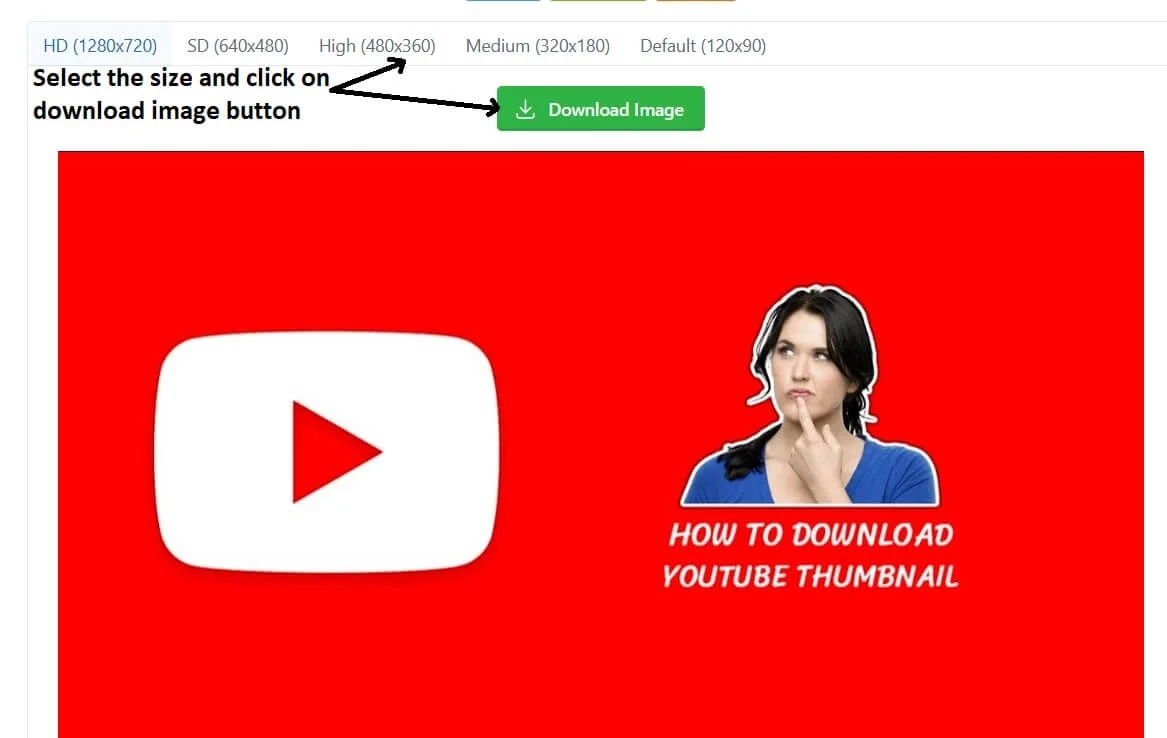
- Paste & Generate: Paste the link into the FluxyTools Thumbnail Downloader.
- Instant Preview: Click "Generate". Our tool automatically checks for the highest available resolution (checking for 4K or 1080p availability).
- Download: Click the "Download" button under the HD version to save it to your device.
Method 2: The Manual Browser Trick
If you prefer a technical approach, you can construct the URL yourself:
- Find the Video ID (the characters after
v=in the address bar). - Paste it into this template:
https://img.youtube.com/vi/[VIDEO_ID]/maxresdefault.jpg - Press Enter. If the image loads, right-click and select "Save Image As".
- Warning: If you see a generic grey image, it means the HD version does not exist for that video.
Copyright & Fair Use Guidelines
As a responsible creator, trust is paramount. Is downloading thumbnails legal? Yes, the act of downloading is legal, but how you use the image matters.
- Allowed (Fair Use): Using thumbnails for educational commentary, critique, news reporting, or personal research/inspiration folders.
- Not Allowed: Re-uploading someone else's thumbnail as your own. This is a violation of YouTube's Community Guidelines and can lead to copyright strikes.
Pro Tips: Optimizing Your Own Thumbnails
Once you have analyzed downloaded thumbnails, apply these lessons to your channel:
- High Contrast: Ensure your text pops against the background.
- Faces Matter: Expressive faces increase CTR. Use our Channel Logo Downloader if you need to retrieve high-res branding assets to overlay on your image.
- Title Synergy: The thumbnail shouldn't just repeat the title. Use a YouTube Title Generator to create catchy hooks that complement your visual design.
Frequently Asked Questions
Generally, YouTube's API caps thumbnails at 1280x720 (HD). Even if a video is 4K, the standard generated thumbnail is usually 720p. FluxyTools always fetches the highest version available from the server.
If the original creator uploaded an image that wasn't in the 16:9 aspect ratio, YouTube adds black bars to fill the space. This is part of the original file, not an error with the downloader.
Yes. You can paste a Shorts URL (e.g., youtube.com/shorts/...) into the tool, and it will extract the vertical thumbnail used by the system.
Yes. Our tool is client-side secure. We do not store your data, and we do not require you to install any suspicious browser extensions or software.
Supercharge Your Channel with These Tools:
- Analyze Competitors: YouTube Trend Explorer
- Optimize SEO: YouTube Hashtag Generator
- Write Better Copy: Video Description Generator